1 poll机制
1.1 阻塞与非阻塞IO
APP 调用 open 函数时,不传入O_NONBLOCK,APP 调用 read 函数读取数据时,为阻塞io。
APP 调用 open 函数时,传入O_NONBLOCK表示“非阻塞”,APP 调用 read 函数读取数据时,如果驱动程序中有数据,那么 APP 的 read函数会返回数据,否则会立刻返回错误。这种需要APP反复主动去”轮询”设备,否则无法及时响应。
注意:对于普通文件、块设备文件,O_NONBLOCK不起作用。
注意:对于字符设备文件,O_NONBLOCK 起作用的前提是驱动程序针对O_NONBLOCK做了处理
只能在 open 时表明 O_NONBLOCK 吗?
在 open 之后,也可以通过 fcntl 修改为阻塞或非阻塞:
- open 时设置:
int fd = open(“/dev/xxx”, O_RDWR | O_NONBLOCK); /* 非阻塞方式 */
int fd = open(“/dev/xxx”, O_RDWR ); /* 阻塞方式 */- open 之后设置:
int flags = fcntl(fd, F_GETFL);
fcntl(fd, F_SETFL, flags | O_NONBLOCK); /* 非阻塞方式 */
fcntl(fd, F_SETFL, flags & ~O_NONBLOCK); /* 阻塞方式 */驱动处理O_NONBLOCK flag时,如果没有数据read函数立即返回。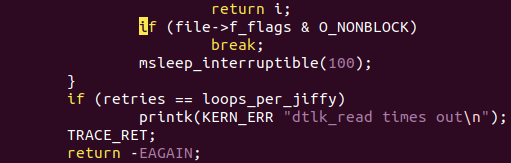
1.2 带超时的阻塞IO(poll/select)
POLL 机制、SELECT机制是完全一样的,只是 APP 接口函数不一样。简单地说,它们就是 “定个闹钟” :在调用 poll、 select 函数时可以传入“超时时间”。在这段时间内,条件合适时(比如有数据可读、有空间可写)就会立刻返回,否则等到“超时时间”结束时返回错误。
1.2.1 select
select会循环遍历它所监测的fd_set内的所有文件描述符对应的驱动程序的poll函数。select通过每个设备文件对应的poll函数提供的信息判断当前是否有资源可用(如可读或写),如果有的话则返回可用资源的文件描述符个数,没有的话则睡眠,等待有资源变为可用时再被唤醒继续执行。
那么select会有2个结果:
1, 查询到资源,返回查询到的fd总数。
2,没查到,则睡眠
	①带timeout参数,timeout后,唤醒退出,此时fd总数为0
	②不带timeout, 阻塞且睡眠中,直到有资源可用才唤醒
fd_set结构体就是一个可用资源文件描述符的集合。
FD_SET(int fd, fd_set *fdset);       //将fd加入set集合
FD_CLR(int fd, fd_set *fdset);       //将fd从set集合中清除
FD_ISSET(int fd, fd_set *fdset);     //检测fd是否在set集合中,不在则返回0
FD_ZERO(fd_set *fdset);              //将set清零使集合中不含任何fd
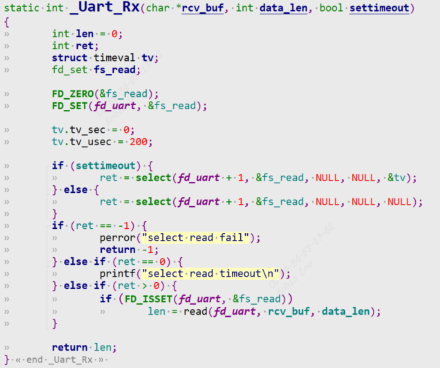 该示例假如传入200us的timeout,表示200us内有被驱动唤醒就可以检测到fd在set集合中,从而调用read读取数据。假如不传入timeout,那么select查询会立即返回。
1.2.2 poll
休眠唤醒机制实现简单。但是有一个缺点,如果按键一直未按下,read函数将会一直休眠,应用程序用户进程一直被阻塞。
1. poll机制就是给它加一个超时机制,防止一直休眠和用户线程被阻塞。
2. APP 不知道驱动程序中是否有数据,可以先调用 poll 函数查询一下, poll 函数可以传入超时时间;
3. APP 进入内核态,调用到驱动程序的 poll 函数
    3.1 如果发现没有数据时就休眠一段时间;当超时时间到了之后,内核也会唤醒 APP;
    3.2 当有数据时,比如当按下按键时,驱动程序的中断服务程序被调用,它会记录数据、唤醒 APP;
4. APP 根据 poll 函数的返回值就可以知道是否有数据,如果有数据就调用read 得到数据
poll/select 监测的事件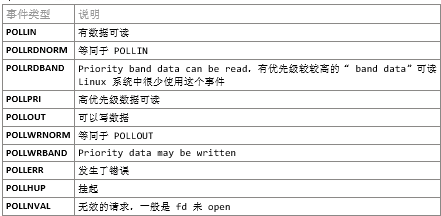
struct pollfd fds[1];
nfds_t nfds = 1;
while (1) {
	fds[0].fd = fd;
	fds[0].events  = POLLIN;
	fds[0].revents = 0;
	ret = poll(fds, nfds, 5000);
	if (ret > 0) {
		if (fds[0].revents == POLLIN) {
			while (read(fd, &event, sizeof(event)) == sizeof(event)) {
				printf("get event: type = 0x%x, code = 0x%x, value = 0x%x\n", event.type, event.code, event.value);
			}
		}
	} else if (ret == 0) {
		printf("time out\n");
	} else {
		printf("poll err\n");
	}
}
1.3 休眠唤醒
poll底层机制用到了一个休眠唤醒机制,既等待队列wait_queue。参考:linux内核机制-1-休眠唤醒机制
1.3.1 等待队列
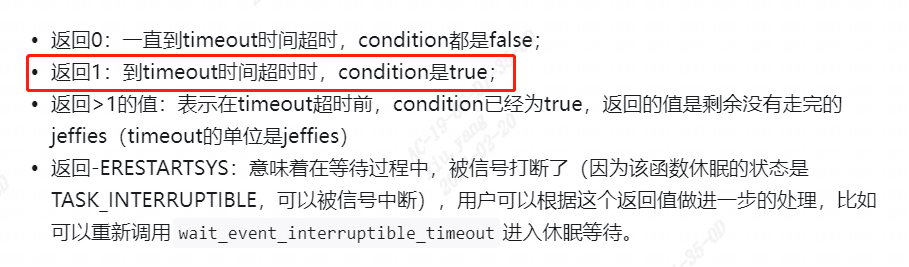
wait_event_interruptible_timeout: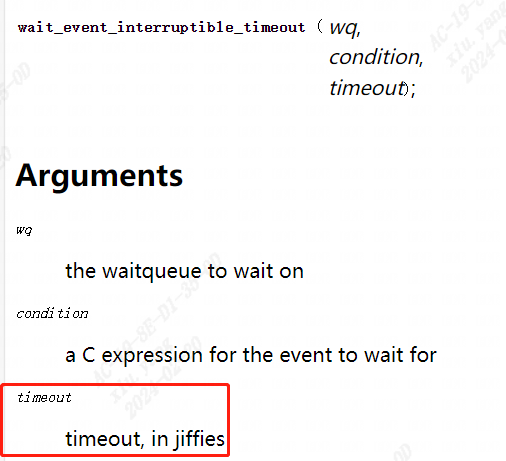
void init_waitqueue_head(wait_queue_head_t *q);
void wake_up(wait_queue_head_t *q)
void wake_up_interruptible(wait_queue_head_t *q)
wait_event(wq, condition);
wait_event_timeout(wq, condition, timeout);
wait_event_interruptible(wq, condition);
wait_event_interruptible_timeout(wq, condition, timeout);
1.3.2 等待队列项
利用等待队列项来实现read函数的阻塞式访问,底层驱动去进行状态切换。下图把wait_event的方式换成等待队列项。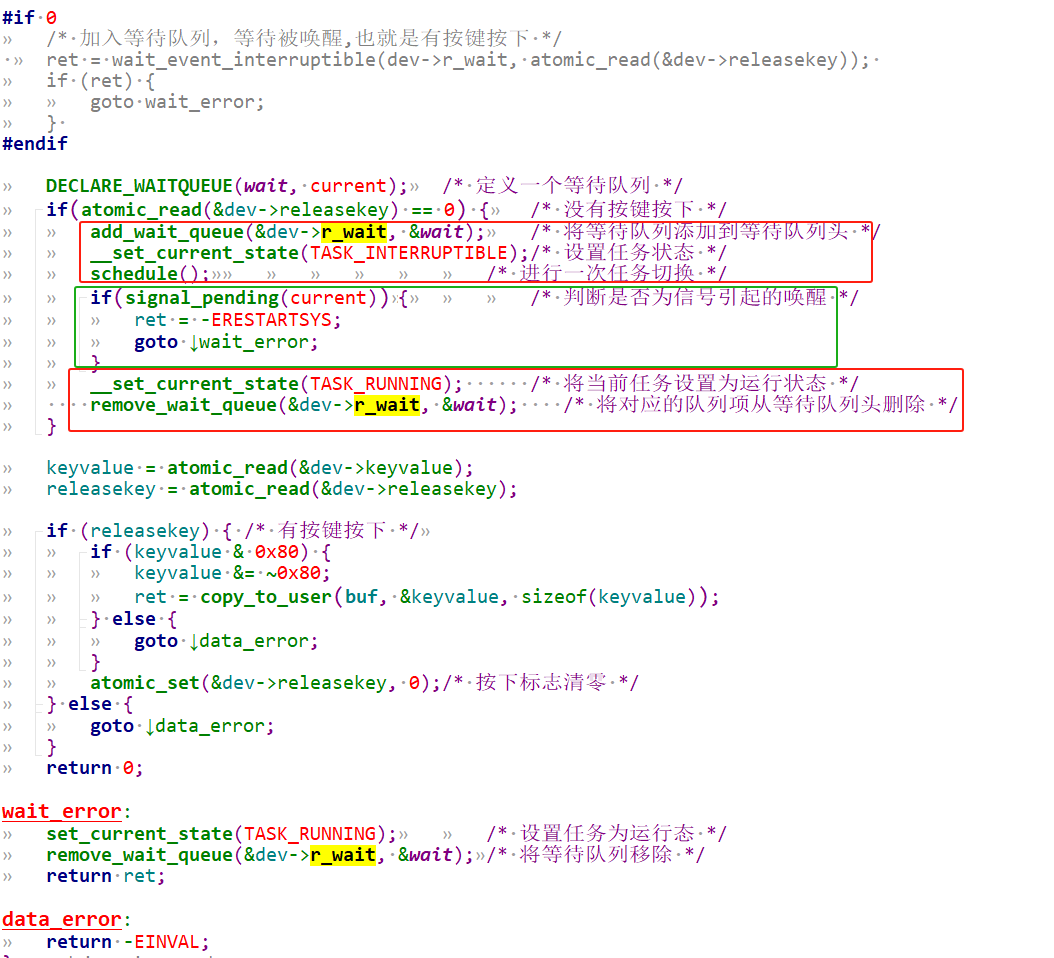
3 poll机制驱动底层原理
3.1 我们期望的poll流程
我们期望的大致流程如下: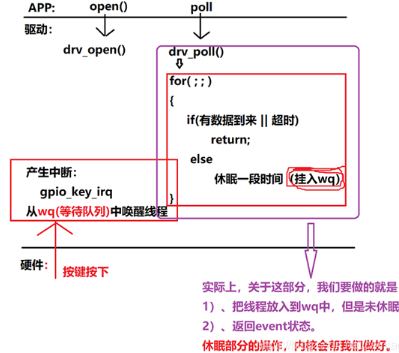
1. app进行open, drv进行drv_open,注册好中断服务
2. app进行poll , drv进行drv_poll
3. 第一次如果没有数据到来,那么会执行else进行休眠,加入等待队列。
    要么被中断服务程序唤醒,进入for循环此时有数据到来返回;
    要么超时,也会从等待队列唤醒回来,进入for循环此时返回超时
可以看到会查询判断2次,但实际上内核做的更好,我们drv_poll中只需要(这些流程内核帮我们已经做好了):
1.把线程放入wq等待队列,并不会调用休眠
2.返回event状态
3.2 Linux内核实际的poll机制
实际内核中poll函数流程如下:
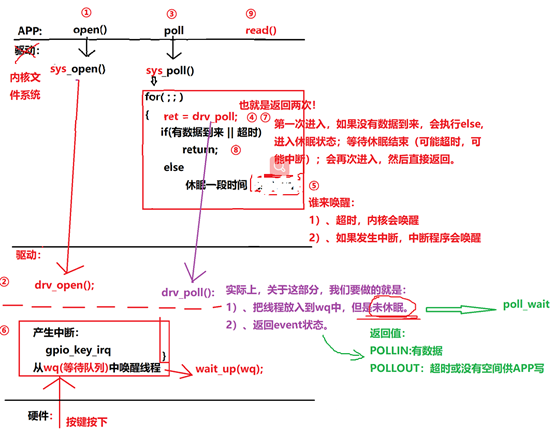
1. app进行open, drv进行drv_open,注册好中断服务
2. app进行poll , 内核文件系统进行sys_poll
3. 调用驱动开发者实现的drv_poll
    调用poll_wait,把线程加入wq,但是不会进入休眠,而是直接返回event状态
4. drv_poll返回后,sys_poll中进行数据判断(如果第一次进入没有数据到来,执行else, 将线程休眠(可以看到休眠是drv_poll上层sys_poll已经帮我们做好了),如果有数据则直接返回,那么就只会进入一次drv_poll)
   sys_poll函数执行else休眠的过程中,会被event唤醒or被超时唤醒
   第2进入for循环执行drv_poll,如果被event唤醒了,则返回数据,否则说明是超时唤醒,返回超时
5.最终内核文件系统sys_poll返回,唤醒userspace线程可以看到当用户调用poll函数,在底层drv下可能会调用2次drv_poll。用户线程不会被一直阻塞休眠,要么有数据时中断的event唤醒,要么超时唤醒。我们只要实现drv_poll的部分,也就是紫色绿色的提示部分。
4 poll驱动编程实例(gpio key为例)
使用 poll 机制时,驱动程序的核心就是提供对应的 drv_poll 函数。在drv_poll 函数中要做 2 件事:
1. 把当前线程挂入队列 wq: poll_wait
	a) APP 调用一次 poll,drv_poll可能会被调用 2 次,但是我们并不需要把当前线程挂入队列 2 次。
	b) 可以使用内核的帮助函数 poll_wait 把线程挂入队列,如果线程已经在队列里了,它就不会再次挂入。
2. 返回设备状态:
	APP 调用 poll 函数时,有可能是查询“有没有数据可以读”: POLLIN
	也有可能是查询“你有没有空间给我写数据”: POLLOUT。
	所以 drv_poll 要返回自己的当前状态: (POLLIN | POLLRDNORM) 或 (POLLOUT | POLLWRNORM)。
a) POLLRDNORM 等同于 POLLIN,为了兼容某些 APP 把它们一起返回。
b) POLLWRNORM 等同于 POLLOUT ,为了兼容某些 APP 把它们一起返回。
APP 调用 poll 后,很有可能会休眠。对应的,在中断服务程序中,也要有唤醒操作。
完整驱动代码如下:
#include <linux/module.h>
#include <linux/poll.h>
#include <linux/fs.h>
#include <linux/errno.h>
#include <linux/miscdevice.h>
#include <linux/kernel.h>
#include <linux/major.h>
#include <linux/mutex.h>
#include <linux/proc_fs.h>
#include <linux/seq_file.h>
#include <linux/stat.h>
#include <linux/init.h>
#include <linux/device.h>
#include <linux/tty.h>
#include <linux/kmod.h>
#include <linux/gfp.h>
#include <linux/gpio/consumer.h>
#include <linux/platform_device.h>
#include <linux/of_gpio.h>
#include <linux/of_irq.h>
#include <linux/interrupt.h>
#include <linux/irq.h>
#include <linux/slab.h>

struct gpio_key{
	int gpio;
	struct gpio_desc *gpiod;
	int flag;
	int irq;
} ;

static struct gpio_key *gpio_keys_100ask;
static int major = 0;
static struct class *gpio_key_class;

/* 环形缓冲区 */
#define BUF_LEN 128
static int g_keys[BUF_LEN];
static int r, w;

#define NEXT_POS(x) ((x+1) % BUF_LEN)

static int is_key_buf_empty(void){
	return (r == w);
}

static int is_key_buf_full(void){
	return (r == NEXT_POS(w));
}

static void put_key(int key){
	if (!is_key_buf_full()){
		g_keys[w] = key;
		w = NEXT_POS(w);
	}
}

static int get_key(void){
	int key = 0;
	if (!is_key_buf_empty()) {
		key = g_keys[r];
		r = NEXT_POS(r);
	}
	return key;
}

static DECLARE_WAIT_QUEUE_HEAD(gpio_key_wait);

static ssize_t gpio_key_drv_read (struct file *file, char __user *buf, size_t size, loff_t *offset){
	printk("%s %s line %d\n", __FILE__, __FUNCTION__, __LINE__);
	int err;
	int key;

	if (is_key_buf_empty() && (file->f_flags & O_NONBLOCK)){
			return -EAGAIN;
	} else {
		wait_event_interruptible(gpio_key_wait, !is_key_buf_empty());
		key = get_key();
		err = copy_to_user(buf, &key, 4);
	}
	return 4;
}

static unsigned int gpio_key_drv_poll(struct file *fp, poll_table * wait){
	printk("%s %s line %d\n", __FILE__, __FUNCTION__, __LINE__);
	poll_wait(fp, &gpio_key_wait, wait);
	return is_key_buf_empty() ? 0 : POLLIN | POLLRDNORM;
}

static struct file_operations gpio_key_drv = {
	.owner	 = THIS_MODULE,
	.read    = gpio_key_drv_read,
	.poll    = gpio_key_drv_poll,
};

static irqreturn_t gpio_key_isr(int irq, void *dev_id){
	struct gpio_key *gpio_key = dev_id;
	int val;
	int key;

	val = gpiod_get_value(gpio_key->gpiod);

	printk("key %d %d\n", gpio_key->gpio, val);
	key = (gpio_key->gpio << 8) | val;
	put_key(key);
	wake_up_interruptible(&gpio_key_wait);
	return IRQ_HANDLED;
}

/* 1. 从platform_device获得GPIO
 * 2. gpio=>irq
 * 3. request_irq
 */
static int gpio_key_probe(struct platform_device *pdev){
	int err;
	struct device_node *node = pdev->dev.of_node;
	int count;
	int i;
	enum of_gpio_flags flag;

	count = of_gpio_count(node);
	if (!count){
		printk("%s %s line %d, there isn't any gpio available\n", __FILE__, __FUNCTION__, __LINE__);
		return -1;
	}

	gpio_keys_100ask = kzalloc(sizeof(struct gpio_key) * count, GFP_KERNEL);
	for (i = 0; i < count; i++){
		gpio_keys_100ask[i].gpio = of_get_gpio_flags(node, i, &flag);
		if (gpio_keys_100ask[i].gpio < 0){
			printk("%s %s line %d, of_get_gpio_flags fail\n", __FILE__, __FUNCTION__, __LINE__);
			return -1;
		}
		gpio_keys_100ask[i].gpiod = gpio_to_desc(gpio_keys_100ask[i].gpio);
		gpio_keys_100ask[i].flag = flag & OF_GPIO_ACTIVE_LOW;
		gpio_keys_100ask[i].irq  = gpio_to_irq(gpio_keys_100ask[i].gpio);
	}

	for (i = 0; i < count; i++){
		err = request_irq(gpio_keys_100ask[i].irq, gpio_key_isr, IRQF_TRIGGER_RISING | IRQF_TRIGGER_FALLING, "100ask_gpio_key", 			&gpio_keys_100ask[i]);
	}

	major = register_chrdev(0, "100ask_gpio_key", &gpio_key_drv);
	gpio_key_class = class_create(THIS_MODULE, "100ask_gpio_key_class");/* /sys/class/100ask_gpio_key_class */
	if (IS_ERR(gpio_key_class)) {
		printk("%s %s line %d\n", __FILE__, __FUNCTION__, __LINE__);
		unregister_chrdev(major, "100ask_gpio_key");
		return PTR_ERR(gpio_key_class);
	}
	device_create(gpio_key_class, NULL, MKDEV(major, 0), NULL, "100ask_gpio_key"); /* /dev/100ask_gpio_key */
    return 0;
}

static int gpio_key_remove(struct platform_device *pdev){
	struct device_node *node = pdev->dev.of_node;
	int count;
	int i;

	device_destroy(gpio_key_class, MKDEV(major, 0));
	class_destroy(gpio_key_class);
	unregister_chrdev(major, "100ask_gpio_key");

	count = of_gpio_count(node);
	for (i = 0; i < count; i++){
		free_irq(gpio_keys_100ask[i].irq, &gpio_keys_100ask[i]);
	}
	kfree(gpio_keys_100ask);
    return 0;
}

static const struct of_device_id ask100_keys[] = {
    { .compatible = "100ask,gpio_key" },
    { },
};
static struct platform_driver gpio_keys_driver = {
    .probe      = gpio_key_probe,
    .remove     = gpio_key_remove,
    .driver     = {
        .name   = "100ask_gpio_key",
        .of_match_table = ask100_keys,
    },
};

static int __init gpio_key_init(void){
    int err;
    err = platform_driver_register(&gpio_keys_driver);
	return err;
}
static void __exit gpio_key_exit(void){
    platform_driver_unregister(&gpio_keys_driver);
}
module_init(gpio_key_init);
module_exit(gpio_key_exit);
MODULE_LICENSE("GPL");
4.1 probe函数分析
定义gpio_key: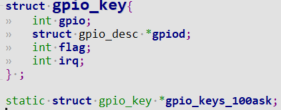 先确保dts中含有
gpio_key设备树节点,才能通过.compatible = "100ask,gpio_key"匹配plateform_device和platform_driver, 当insmod ko时probe函数被调用。
struct device_node *node = pdev->dev.of_node;//可以从platform_device获取到device_node

of_gpio_count可以根据设备树节点获取到gpio的数量。

of_get_gpio_flags可以根据设备树节点获取到gpio编号和gpio flags
 获取gpio描述符和gpio中断号
 注册中断服务程序
gpio_key_isr,当按键按下会触发gpio中断,执行gpio_key_isr.
4.2 drv_poll函数分析
static DECLARE_WAIT_QUEUE_HEAD(gpio_key_wait);这里先定义并初始化一个wait_queue gpio_key_wait。

drv_poll函数中调用poll_wait将线程加入等待队列,并返回event。- 如果有数据,返回
POLLIN | POLLRDNORM(那么drv_poll只会被调用1次); 回到sys_poll - 如果没有数据则返回0, 也回到
sys_poll
- 如果有数据,返回
- 回到
sys_poll后发现- 如果有数据,直接返回
- 如果没有数据则进入休眠,当超时或者被
event唤醒后,sys_poll又会再次进入drv_poll,此时poll_wait不会再次将线程加入等待队列,判断is_key_buf_empty,如果是按键按下触发中断响应,那么就有数据,返回POLLIN | POLLRDNORM,否则无数据表示是被超时唤醒,event为0。
sys_poll最终返回,回到userspace线程
4.3 drv_read函数分析
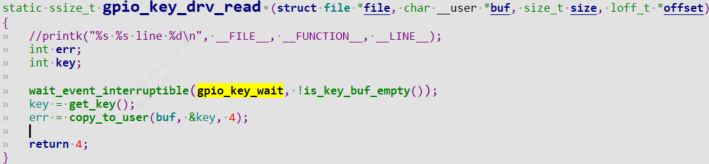 当userspace得知驱动有数据时,调用read函数,进入
drv_read中调用wait_event_interruptible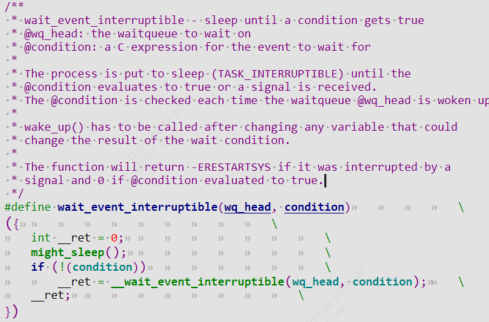 这里是利用等待队列,等待队列
gpio_key_wait的event为true后,wait_event_interruptible该函数会返回。那么在对应的中断处理函数中,需要call wake_up函数来唤醒等待队列,并且把event设置成true,也就是把wait_event_interruptible的condition设置成true.
4.4 按键中断服务函数分析
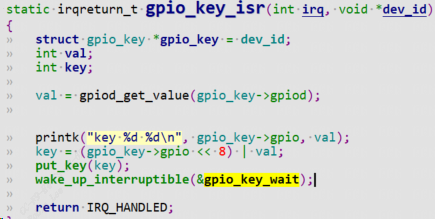
put_key是将event设置成true,这样表示有数据了,is_key_buf_empty非空了。调用wake_up_interrptible函数唤醒等待队列gpio_key_wait,因此drv_read函数就能立马返回数据。
4.5 测试
测试demo用户态程序如下:
#include <sys/types.h>
#include <sys/stat.h>
#include <fcntl.h>
#include <unistd.h>
#include <stdio.h>
#include <string.h>
#include <poll.h>
/*
 * ./button_test /dev/100ask_gpio_key
 *
 */
int main(int argc, char **argv){
	int fd;
	int val;
	struct pollfd fds[1];
	int timeout_ms = 5000;
	int ret;

	if (argc != 2) {
		printf("Usage: %s <dev>\n", argv[0]);
		return -1;
	}

	fd = open(argv[1], O_RDWR);
	if (fd == -1){
		printf("can not open file %s\n", argv[1]);
		return -1;
	}
	fds[0].fd = fd;
	fds[0].events = POLLIN;

	while (1){
		ret = poll(fds, 1, timeout_ms);
		if ((ret == 1) && (fds[0].revents & POLLIN)){
			read(fd, &val, 4);
			printf("get button : 0x%x\n", val);
		}else{
			printf("timeout\n");
		}
	}
	close(fd);
	return 0;
}