1 APP 读取按键方式
- 查询方式
- 休眠-唤醒方式
- poll 方式
- 异步通知方式
第2、3、4种方法,都涉及中断服务程序。
1.1 查询方式
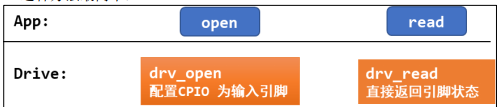 APP 调用 open 时,导致驱动中对应的 open 函数被调用,在里面配置 GPIO 为输入引脚。 APP 调用 read 时,导致驱动中对应的 read 函数被调用,它读取寄存器,把引脚状态直接返回给 APP,APP需要反复read查询引脚电平状态。
很明显,查询方式用的非阻塞IO(O_NONBLOCK)。
1.2 休眠-唤醒方式
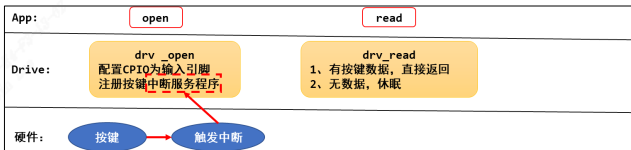
- APP 调用 open 时,导致驱动中对应的 open 函数被调用,在里面配置GPIO 为输入引脚;并且注册 GPIO 的中断处理函数。
- APP 调用 read 时,导致驱动中对应的 read 函数被调用,如果有按键数据则直接返回给 APP;否则 APP 在内核态read函数中休眠。
- 当用户按下按键时, GPIO 中断被触发,导致驱动程序之前注册的中断服务程序被执行。它会记录按键数据,read函数被唤醒,执行驱动代码,把按键数据返回给APP(用户空间)。
1.3 poll 方式
上面的休眠-唤醒方式有个缺点:如果一直没操作按键,那么 APP 就会永远休眠。
我们可以给 APP 定个闹钟,这就是 poll 方式。当超时后就直接返回不再休眠。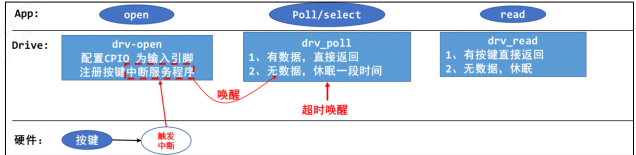
- APP 调用 open 时,导致驱动中对应的 open 函数被调用,在里面配置GPIO 为输入引脚;并且注册 GPIO 的中断处理函数。
- APP 调用 poll 或 select 函数,意图是“查询”是否有数据,这 2 个函数都可以指定一个超时时间,即在这段时间内没有数据的话就返回错误。这会导致驱动中对应的
drv_poll函数被调用,如果有按键数据则直接返回给 APP;否则 APP 在内核态休眠一段时间。 - 当按下按键时, GPIO 中断被触发,导致驱动程序之前注册的中断服务程序被执行。它会记录按键数据,并唤醒休眠中的 APP。如果用户没按下按键,但是超时时间到了,内核也会唤醒 APP。
所以 APP 被唤醒有 2 种原因:用户操作了按键或者超时。被唤醒的 APP 在内核态继续运行,即继续执行驱动代码,把 “状态” 返回给 APP(用户空间)。APP 得到 poll/select 函数的返回结果后,如果确认是有数据的,则再调用 read 函数,这会导致驱动中的 read 函数被调用,这时驱动程序中含有数据,会直接返回数据。
1.4 异步通知方式
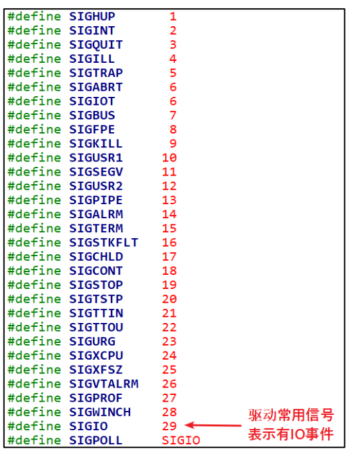
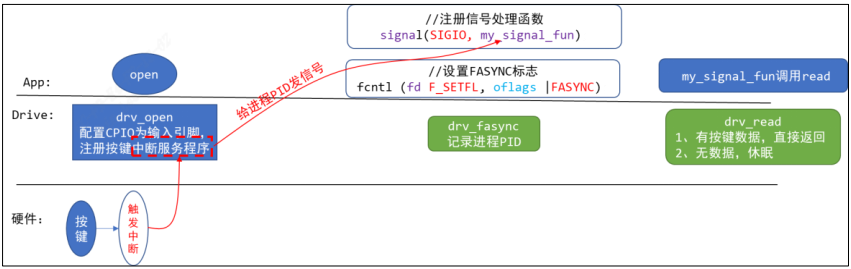 异步通知的实现原理是:内核给 APP 发信号。信号有很多种,这里发的是SIGIO。
驱动程序中构造、注册一个 file_operations 结构体,里面提供有对应的open,read,fasync 函数。
- APP 调用 open 时,导致驱动中对应的 open 函数被调用,在里面配置GPIO 为输入引脚;并且注册 GPIO 的中断处理函数。
- APP 给信号
SIGIO注册自己的处理函数:my_signal_fun。 - APP 调用
fcntl函数,把驱动程序的 flag 改为FASYNC,这会导致驱动程序的fasync函数被调用,它只是简单记录进程 PID。 - 当用户按下按键时, GPIO 中断被触发,导致驱动程序之前注册的中断服务程序被执行。它会记录按键数据,然后给进程 PID 发送
SIGIO信号。 - APP 收到信号后会被打断,先执行信号处理函数:在信号处理函数中可以去调用 read 函数读取按键值。
- 信号处理函数返回后, APP 会继续执行原先被打断的代码
#include <stdio.h>
#include <unistd.h>
#include <signal.h>
void my_sig_func(int signo) {
    printf("get a signal : %d\n", signo);
}
int main(int argc, char **argv) {
    int i = 0;
    signal(SIGIO, my_sig_func);
    while (1) {
        printf("Hello, world %d!\n", i++);
        sleep(2);
    }
    return 0;
}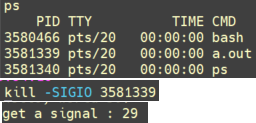
 发送一个SIGIO讯号给进程
3581339 my_sig_func函数,可以看到打印”get a signal 29“,即为SIGIO信号。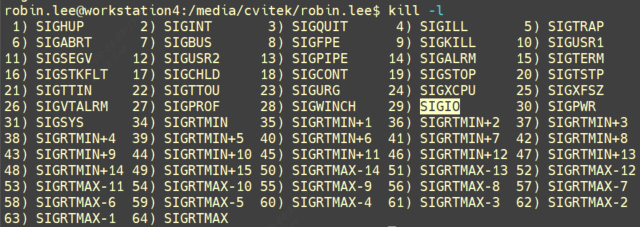
2 GPIO按键驱动
2.1 按键驱动框架
按键驱动程序最简单的方法: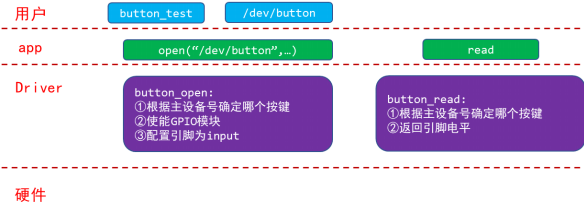 我们的目的写出一个容易扩展到各种芯片、各种板子的按键驱动程序,所以驱动程序分为上下两层:
button_drv.c分配/设置/注册file_operations结构体起承上启下的作用,向上提供button_open,button_read供 APP 调用。而这 2 个函数又会调用底层硬件提供的p_button_opr中的 init、 read 函数操作硬件。board_xxx.c实现p_button_opr结构体,这个结构体是我们自己抽象出来的,里面定义单板 xxx的按键操作函数。这样的结构易于扩展,对于不同的单板,只需要替换board_xxx.c提供自己的button_operations结构体即可。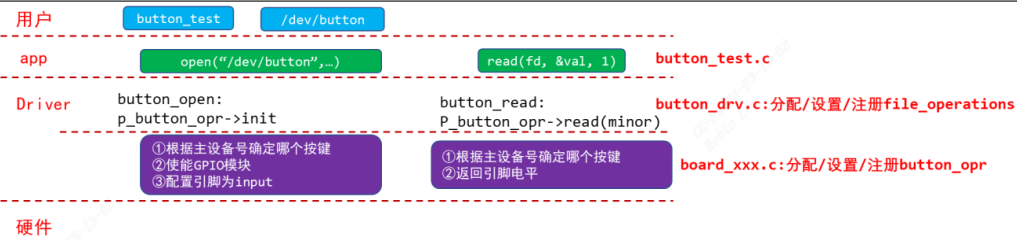
2.1.1 button_operations 结构体
button_drv.h
#ifndef _BUTTON_DRV_H
#define _BUTTON_DRV_H
struct button_operations {
    int count;
    void (*init) (int which);
    int (*read) (int which);
};
void register_button_operations(struct button_operations *opr);
void unregister_button_operations(void);
#endif
board_xxx.c
#include <linux/module.h>
#include <linux/errno.h>
#include <linux/kernel.h>
#include <linux/major.h>
#include <linux/sched.h>
#include <linux/slab.h>
#include <linux/fcntl.h>
#include <linux/fs.h>
#include <linux/signal.h>
#include <linux/mutex.h>
#include <linux/mm.h>
#include <linux/timer.h>
#include <linux/wait.h>
#include <linux/skbuff.h>
#include <linux/proc_fs.h>
#include <linux/poll.h>
#include <linux/capi.h>
#include <linux/kernelcapi.h>
#include <linux/init.h>
#include <linux/device.h>
#include <linux/moduleparam.h>
#include "button_drv.h"
static void board_xxx_button_init_gpio (int which){
    printk("%s %s %d, init gpio for button %d\n", __FILE__, __FUNCTION__, __LINE__, which);
}
static int board_xxx_button_read_gpio (int which){
    printk("%s %s %d, read gpio for button %d\n", __FILE__, __FUNCTION__, __LINE__, which);
    return 1;
}
static struct button_operations my_buttons_ops ={
    .count = 2,
    .init  = board_xxx_button_init_gpio,
    .read  = board_xxx_button_read_gpio,
};
int board_xxx_button_init(void){
    register_button_operations(&my_buttons_ops);
    return 0;
}
void board_xxx_button_exit(void){
    unregister_button_operations();
}
module_init(board_xxx_button_init);
module_exit(board_xxx_button_exit);
MODULE_LICENSE("GPL")
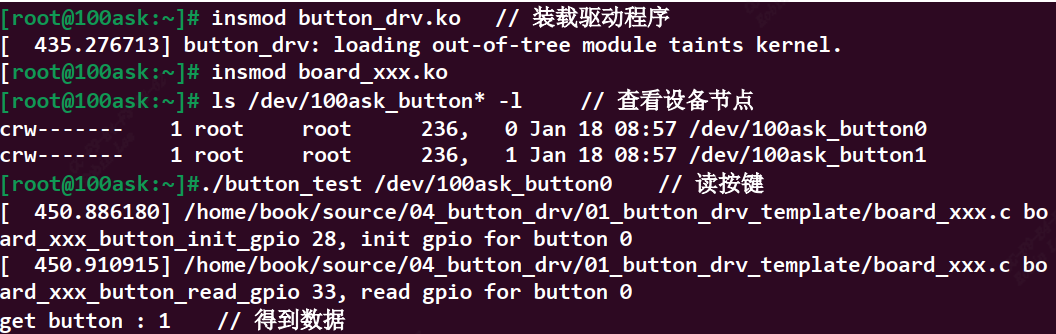
board_xxx.c里面实现了具体单板的button_operations,当insmod这个驱动时,调用 register_button_operations 函数,把my_buttons_ops这个结构体注册到上层驱动中,这里.init .read函数先不去实现。
2.1.2 file_operations 结构体
button_drv.c
#include <linux/module.h>
#include <linux/errno.h>
#include <linux/kernel.h>
#include <linux/major.h>
#include <linux/sched.h>
#include <linux/slab.h>
#include <linux/fcntl.h>
#include <linux/fs.h>
#include <linux/signal.h>
#include <linux/mutex.h>
#include <linux/mm.h>
#include <linux/timer.h>
#include <linux/wait.h>
#include <linux/skbuff.h>
#include <linux/proc_fs.h>
#include <linux/poll.h>
#include <linux/capi.h>
#include <linux/kernelcapi.h>
#include <linux/init.h>
#include <linux/device.h>
#include <linux/moduleparam.h>
#include "button_drv.h"

static int major = 0;
static struct button_operations *p_button_opr;
static struct class *button_class;
static int button_open (struct inode *inode, struct file *file)
{
    int minor = iminor(inode);
    p_button_opr->init(minor);
    return 0;
}
static ssize_t button_read (struct file *file, char __user *buf, size_t size, loff_t *off)
{
    unsigned int minor = iminor(file_inode(file));
    char level;
    int err;
    level = p_button_opr->read(minor);
    err = copy_to_user(buf, &level, 1);
    return 1;
}
static struct file_operations button_fops = {
    .open = button_open,
    .read = button_read,
};
void register_button_operations(struct button_operations *opr)
{
    int i;
    p_button_opr = opr;
    for (i = 0; i < opr->count; i++)
    {
        device_create(button_class, NULL, MKDEV(major, i), NULL, "100ask_button%d", i);
    }
}
void unregister_button_operations(void)
{
    int i;
    for (i = 0; i < p_button_opr->count; i++)
    {
        device_destroy(button_class, MKDEV(major, i));
    }
}

EXPORT_SYMBOL(register_button_operations);
EXPORT_SYMBOL(unregister_button_operations);

int button_init(void)
{
    major = register_chrdev(0, "100ask_button", &button_fops);
    button_class = class_create(THIS_MODULE, "100ask_button");
    if (IS_ERR(button_class))
        return -1;
    return 0;
}
void button_exit(void)
{
    class_destroy(button_class);
    unregister_chrdev(major, "100ask_button");
}
module_init(button_init);
module_exit(button_exit);
MODULE_LICENSE("GPL")
上层是 button_drv.c,按照字符设备驱动标准框架编写,register_button_operations实现了将底层具体的button_operations对象注册进来,调用open/read时便可操作具体的单板,device_create为单板的具体按键创建设备节点。注意insmod顺序要先安装button_drv.ko, 具体单板驱动要后安装,否则register_button_operations函数是未定义的。
2.2 具体单板按键驱动
以imx6ull单板为例,按键引脚为 GPIO5_IO01、 GPIO4_IO14,平时按键电平为高,按下按键后电平为低,如下图: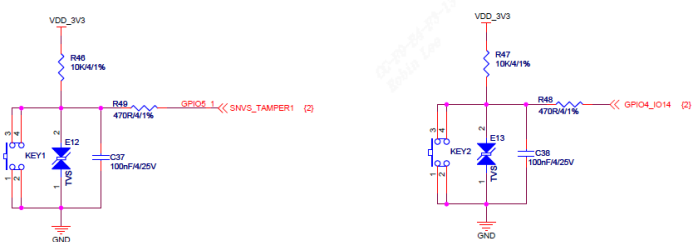
- 使能电源/时钟控制器
- 配置引脚模式成gpio
- 配置引脚方向为输入
- 读取电平
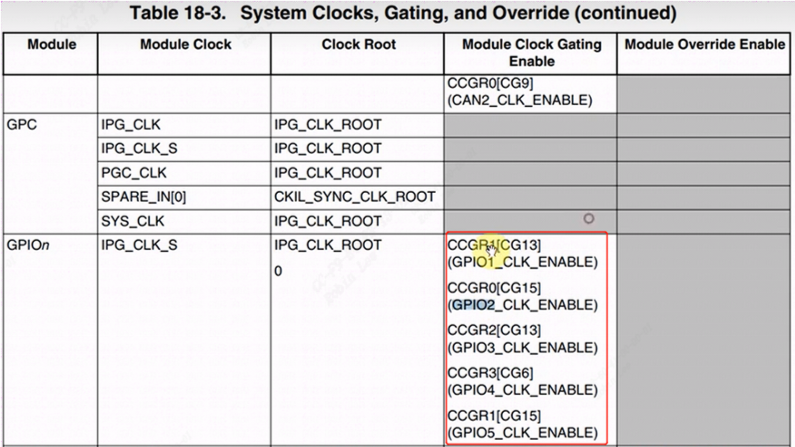
2.2.1 CCM时钟使能
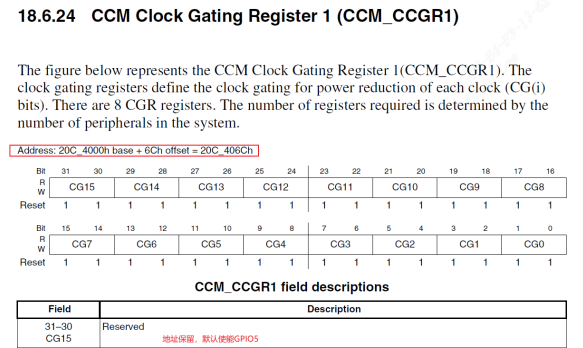
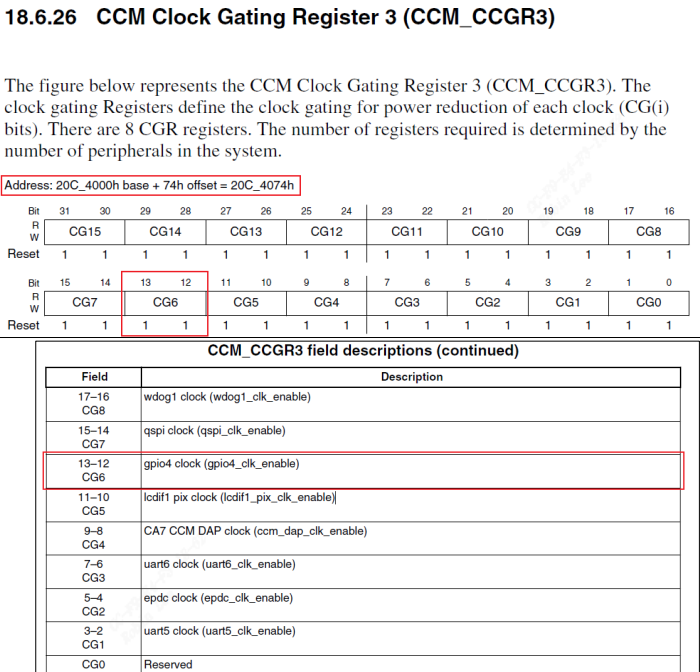 设置
设置 CCM_CCGR1[31:30]、 CCM_CCGR3[13:12]就可以使能 GPIO5、GPIO4,可以设置为以下值
既将CCM_CCGR1[31:30]、 CCM_CCGR3[13:12]设置成0b11即可。
2.2.2 配成GPIO 模式
GPIO5_IO01pinmux 成 GPIO: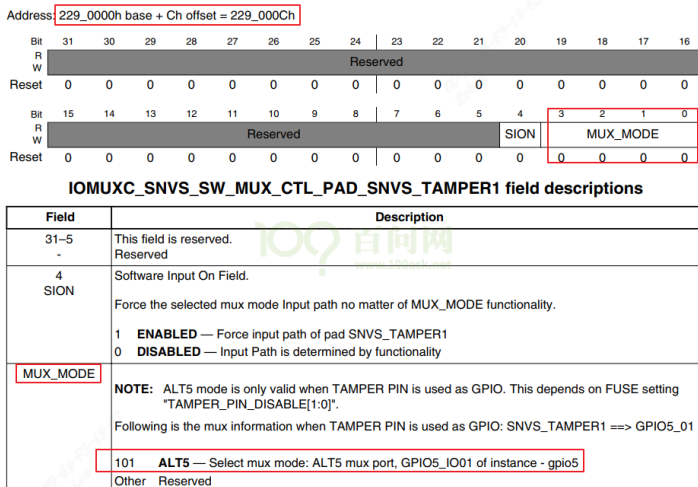
GPIO4_IO14pinmux 成 GPIO: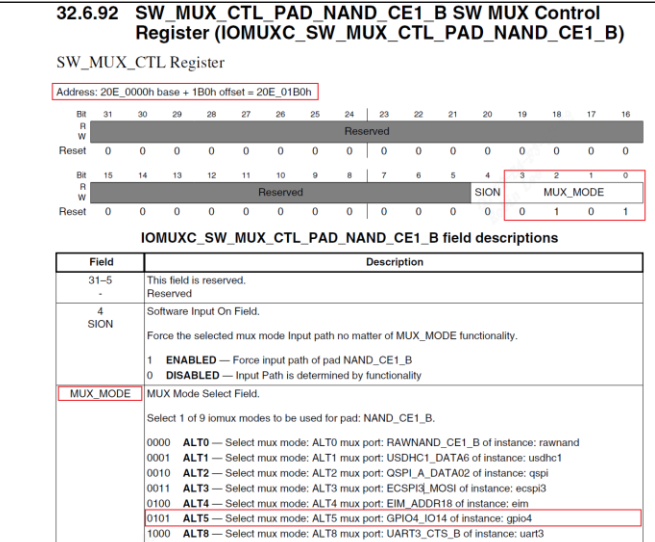
2.2.3 GPIO配成输入
GPIO4,GPIO5寄存器地址: 方向设置寄存器:(
offset 04)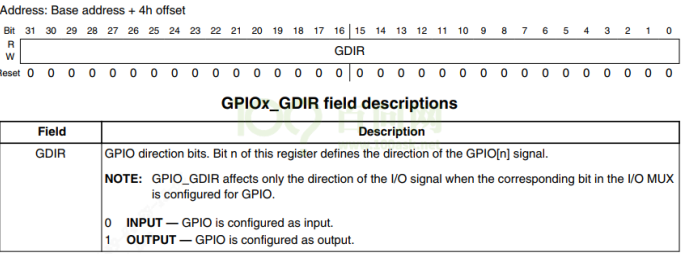
2.2.4 读取gpio电平
注意输入模式下,gpio电平状态得从GPIOx_PSR得到(offset 08)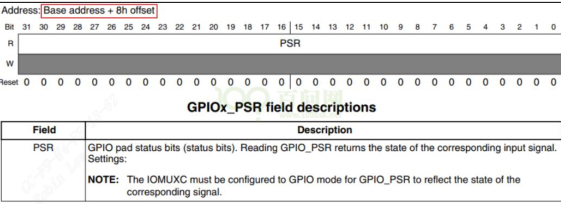 button_board_imx6ull.c
#include <linux/module.h>
#include <linux/fs.h>
#include <linux/io.h>
#include <linux/errno.h>
#include <linux/miscdevice.h>
#include <linux/kernel.h>
#include <linux/major.h>
#include <linux/mutex.h>
#include <linux/proc_fs.h>
#include <linux/seq_file.h>
#include <linux/stat.h>
#include <linux/init.h>
#include <linux/device.h>
#include <linux/tty.h>
#include <linux/kmod.h>
#include <linux/gfp.h>
#include <asm/io.h>
#include "button_drv.h"
struct imx6ull_gpio {
    volatile unsigned int dr;
    volatile unsigned int gdir;
    volatile unsigned int psr;
    volatile unsigned int icr1;
    volatile unsigned int icr2;
    volatile unsigned int imr;
    volatile unsigned int isr;
    volatile unsigned int edge_sel;
};
static volatile unsigned int *CCM_CCGR3;
static volatile unsigned int *CCM_CCGR1;

/* set GPIO5_IO03 as GPIO */
static volatile unsigned int *IOMUXC_SNVS_SW_MUX_CTL_PAD_SNVS_TAMPER1;
/* set GPIO4_IO14 as GPIO */
static volatile unsigned int *IOMUXC_SW_MUX_CTL_PAD_NAND_CE1_B;

static struct imx6ull_gpio *gpio4;
static struct imx6ull_gpio *gpio5;
static void board_imx6ull_button_init (int which) /* 初始化button, which-哪个button */
{
    if (!CCM_CCGR1){
        CCM_CCGR1 = ioremap(0x20C406C, 4);
        CCM_CCGR3 = ioremap(0x20C4074, 4);
        IOMUXC_SNVS_SW_MUX_CTL_PAD_SNVS_TAMPER1 = ioremap(0x229000C, 4);
        IOMUXC_SW_MUX_CTL_PAD_NAND_CE1_B        = ioremap(0x20E01B0, 4);
        gpio4 = ioremap(0x020A8000, sizeof(struct imx6ull_gpio));
        gpio5 = ioremap(0x20AC000, sizeof(struct imx6ull_gpio));
    }
    if (which == 0){
        /* 1. enable GPIO5
         * CG15, b[31:30] = 0b11
         */
        *CCM_CCGR1 |= (3<<30);
        /* 2. set GPIO5_IO01 as GPIO
         * MUX_MODE, b[3:0] = 0b101
         */
        *IOMUXC_SNVS_SW_MUX_CTL_PAD_SNVS_TAMPER1 = 5;
        /* 3. set GPIO5_IO01 as input
         * GPIO5 GDIR, b[1] = 0b0
         */
        gpio5->gdir &= ~(1<<1);
    } else if(which == 1){
        /* 1. enable GPIO4
         * CG6, b[13:12] = 0b11
         */
        *CCM_CCGR3 |= (3<<12);
        /* 2. set GPIO4_IO14 as GPIO
         * MUX_MODE, b[3:0] = 0b101
         */
        *IOMUXC_SW_MUX_CTL_PAD_NAND_CE1_B = 5;
        /* 3. set GPIO4_IO14 as input
         * GPIO4 GDIR, b[14] = 0b0
         */
        gpio4->gdir &= ~(1<<14);
    }
}
static int board_imx6ull_button_read (int which) /* 读button, which-哪个 */
{
    if (which == 0)
        return (gpio5->psr & (1<<1)) ? 1 : 0;
    else
        return (gpio4->psr & (1<<14)) ? 1 : 0;
}
static struct button_operations my_buttons_ops = {
    .count = 2,
    .init = board_imx6ull_button_init,
    .read = board_imx6ull_button_read,
};
int board_imx6ull_button_drv_init(void){
    register_button_operations(&my_buttons_ops);
    return 0;
}
void board_imx6ull_button_drv_exit(void){
    unregister_button_operations();
}
module_init(board_imx6ull_button_drv_init);
module_exit(board_imx6ull_button_drv_exit);
MODULE_LICENSE("GPL")
具体单板驱动insmod会调用 register_button_operations把具体的my_buttons_ops注册进去。当用户open,就会进行board_imx6ull_button_init进行按键寄存器配置。当用户read的时候调用board_imx6ull_button_read读取按键值。

3 测试
Makefile
# 1. 使用不同的开发板内核时, 一定要修改KERN_DIR
# 2. KERN_DIR中的内核要事先配置、编译, 为了能编译内核, 要先设置下列环境变量:
# 2.1 ARCH,          比如: export ARCH=arm64
# 2.2 CROSS_COMPILE, 比如: export CROSS_COMPILE=aarch64-linux-gnu-

KERN_DIR = /home/linux-4.4
all:
	make -C $(KERN_DIR) M=`pwd` modules
	$(CROSS_COMPILE)gcc -o button_test button_test.c
clean:
	make -C $(KERN_DIR) M=`pwd` modules clean
	rm -rf modules.order
	rm -f ledtest
# 参考内核源码drivers/char/ipmi/Makefile
# 要想把a.c, b.c编译成ab.ko, 可以这样指定:
# ab-y := a.o b.o
# obj-m += ab.o
obj-m	+= button_drv.o
obj-m	+= board_xxx.o
测试代码
#include <sys/types.h>
#include <sys/stat.h>
#include <fcntl.h>
#include <unistd.h>
#include <stdio.h>
#include <string.h>
/*
 * ./button_test /dev/100ask_button0
 */
int main(int argc, char **argv) {
	int fd;
	char val;
	/* 1. 判断参数 */
	if (argc != 2)
	{
		printf("Usage: %s <dev>\n", argv[0]);
		return -1;
	}
	/* 2. 打开文件 */
	fd = open(argv[1], O_RDWR);
	if (fd == -1)
	{
		printf("can not open file %s\n", argv[1]);
		return -1;
	}
	/* 3. 写文件 */
	read(fd, &val, 1);
	printf("get button : %d\n", val);
	close(fd);
	return 0;
}